
- Updated on 3/6/2023: added How to fine-tune using WebUI section using d8ahazard/sd_dreambooth_extension
- Updated on 2/27/2023: added Convert Diffusers LoRA Weights for Automatic1111 WebUI section
LoRA (Low-Rank Adaptation) of Large Language Models was included in the Diffusers release a few weeks ago, which enables fine-tuning Stable Diffusion (SD) model with much lower GPU requirements so that I can finally try it on my old RTX 2080 Ti (I now use Tesla V100 most of the time). In addition, LoRA fine-tuning is much faster and the trained weights are much smaller, e.g., ~3M vs. ~5G (Lora models found on civitai.com are often ~100M-200M, which used a larger rank value such as 128, the default is 4 as explained here).
There are many tutorials on fine-tuning Stable Diffusion using Colab [1] and UI tools [2][3][4]. But I did not find a good "self-contained" repo with environment setup, simple sample datasets, training scripts, and instructions so that people can just clone, customize, and run.
In this tutorial, I want to share my experience in fine-tuning Stable Diffusion using HuggingFace training scripts with a few sample datasets. I am still learning about the tips and tricks on this and will report more findings as I go along.
The data and code can be accessed at this repo and this tutorial is based on these references.
Some of my lessons learned are:
- SD fine-tuning evaluation is quite subjective, which has the following implications:
- Intermediate checkpoints may have better results - this is different from traditional fine-tuning where we have objective metrics such as precision, recall, f-score, etc. to evaluate the results and could use various rules to stop training to avoid overfitting.
- Given 1 above, using a system like W&B to track the intermediate experiment results is quite convenient for model selection.
- Making good training datasets may be more important than training hyperparameter tuning.
- Given the same dataset and base model, hyperparameter tuning is the key to fine-tuning quality, which is still largely an art (tricks and tips) than science.
- Merging existing models and/or with your own custom ones may lead to the desired results.
- Base model matters - same prompt and hyperparameters may render very different results using different base models - see a comparison page here
The key topics are:
- how to prepare datasets
- how to run the training and generation scripts
- how to convert Diffusers trained weights for use in Automatic1111 WebUI
- how to fine-tune using WebUI
- how to merge models and test results
Prepare Custom Datasets
Stable Diffusion can be fine-tuned in different ways, such as:
- Text2Image fine-tuning needs a custom dataset with image and caption pairs, which you can find an example with 15 images of my cat Miles in
this folder. I manually added the captions in
metadata.jsonlfile but you can use models like BLIP to generate captions using code or Automatic1111 SD WebUI. - DreamBooth fine-tuning needs just a few (typically 5 to 15) images of a subject or style with no captions, which you can find 4 sample datasets in this folder:
dog: the five dog images used in the original DreamBooth paperglasses: I found some sunglasses images on the Internet trying to reproduce the sunglasses examples from the DreamBooth papercat: my cat Milesmissdong: I use MetaHuman to generate images for a virtual lady, which I named Miss Dong after a Chinese song I like with the same name 董小姐 (listen on Spotify)
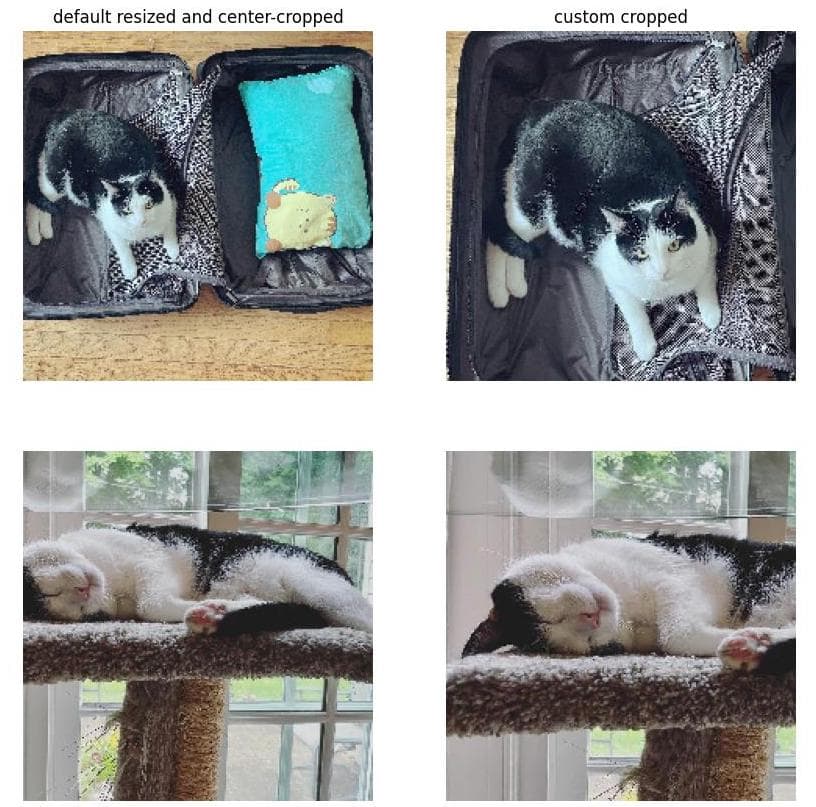
One thing to know when preparing the dataset is how the images are preprocessed before being fed to the model for fine-tuning (see my sample code and examples):
- resized: the shortest side is resized to 512 by default
- cropped: 512x512 is randomly cropped by default - we will use center-cropping instead
- padded: if the image is smaller than 512x512, paddings are added
The following shows the results of my default resizing and cropping (left column) and my custom resizing and cropping (right column) - note the custom cropped images focus more on the subject, which is better for fine-tuning:
In addition, the images should have variations about the subject, such as:
- facial expression
- camera angles
- pose
- background
- properties (clothing, haircut - not for Miles ^_^)
birme.net is a great website for bulk image resizing, renaming, format changing.
Run Training and Use the Fine-tuned Models
To try the examples, you can simply clone the repo and set up the environment as follows (Note that the Python version matters - the code was tested with Python 3.9.11. 3.10.x and 3.8.x may have issues like [1])
git clone https://github.com/harrywang/finetune-sd.git
cd finetune-sd
python -m venv venv
source venv/bin/activate
pip install -r requirements.txt
accelerate config default
Then, you need to log in to HuggingFace with your token and WandB (optional) with your API key:
NOTE: on Ubuntu, if you run into huggingface-cli login command not found error, you may need to add the path of huggingface_hub package to $PATH
pip show huggingface_hub | grep Location
/home/hjwang/.local/lib/python3.8/site-packages
Then, edit vim ~/.profile for bash shell and add the following to $PATH:
if [ -d "/home/hjwang/.local/lib/python3.8/site-packages" ] ; then
    PATH="/home/hjwang/.local/lib/python3.8/site-packages:$PATH"
fi
source ~/.profile then restart the terminal to proceed.
huggingface-cli login
wandb login
Then, you can run the training scripts using my cat dataset as follows - NOTE: you should change the argument values to fit your need, such as learning rate, training steps, checkpoint steps, validation prompt, etc.
-
Conduct a Text2Image fine-tuning using LoRA:
export MODEL_NAME="runwayml/stable-diffusion-v1-5" export DATA_DIR="./data/full-finetune/cat" export OUTPUT_DIR="./models/lora/miles" accelerate launch --mixed_precision="fp16" train_text_to_image_lora.py \ --pretrained_model_name_or_path=$MODEL_NAME \ --train_data_dir=$DATA_DIR \ --dataloader_num_workers=8 \ --resolution=512 --center_crop --random_flip \ --train_batch_size=1 \ --gradient_accumulation_steps=4 \ --max_train_steps=1500 \ --learning_rate=1e-04 \ --max_grad_norm=1 \ --lr_scheduler="cosine" --lr_warmup_steps=0 \ --output_dir=${OUTPUT_DIR} \ --checkpointing_steps=500 \ --validation_prompt="A photo of a cat in a bucket" \ --validation_epochs=10 \ --seed=42 \ --report_to=wandb -
Conduct a DreamBooth fine-tuning using LoRA (
sksbelow is the special token - see more discussion about this here):export MODEL_NAME="runwayml/stable-diffusion-v1-5" export INSTANCE_DIR="./data/dreambooth/cat" export OUTPUT_DIR="./models/dreambooth-lora/miles" accelerate launch train_dreambooth_lora.py \ --pretrained_model_name_or_path=$MODEL_NAME \ --instance_data_dir=$INSTANCE_DIR \ --output_dir=$OUTPUT_DIR \ --instance_prompt="a photo of sks cat" \ --resolution=512 --center_crop \ --train_batch_size=1 \ --gradient_accumulation_steps=4 \ --checkpointing_steps=100 \ --learning_rate=1e-4 \ --lr_scheduler="constant" \ --lr_warmup_steps=0 \ --max_train_steps=1500 \ --validation_prompt="A photo of a sks cat in a bucket" \ --validation_epochs=10 \ --seed=42 \ --report_to="wandb" -
Conduct a DreamBooth fine-tuning using LoRA with class prompt (class images generated by the model) and prior preservation (with weight 0.5):
export MODEL_NAME="runwayml/stable-diffusion-v1-5"
export INSTANCE_DIR="./data/dreambooth/cat"
export CLASS_DIR="./data/dreambooth/cat-class"
export OUTPUT_DIR="./models/dreambooth-lora/miles"

accelerate launch train_dreambooth_lora.py \
  --pretrained_model_name_or_path=$MODEL_NAME  \
  --instance_data_dir=$INSTANCE_DIR \
  --class_data_dir=$CLASS_DIR \
  --output_dir=$OUTPUT_DIR \
  --instance_prompt="a photo of sks cat" \
  --class_prompt="a photo of a cat" \
  --with_prior_preservation --prior_loss_weight=0.5 \
  --resolution=512 \
  --train_batch_size=2 \
  --gradient_accumulation_steps=1 \
  --checkpointing_steps=100 \
  --learning_rate=1e-4 \
  --report_to="wandb" \
  --lr_scheduler="constant" \
  --lr_warmup_steps=0 \
  --max_train_steps=1500 \
  --validation_prompt="A photo of sks cat in a bucket" \
  --num_class_images=200 \
  --validation_epochs=10 \
  --seed=42
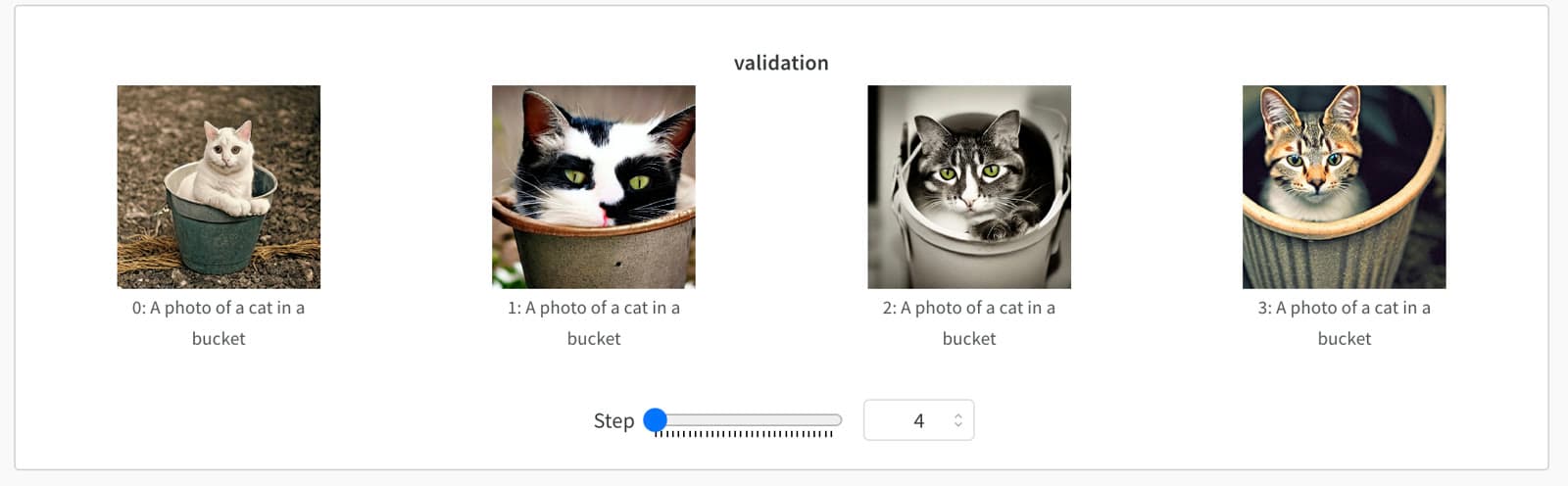
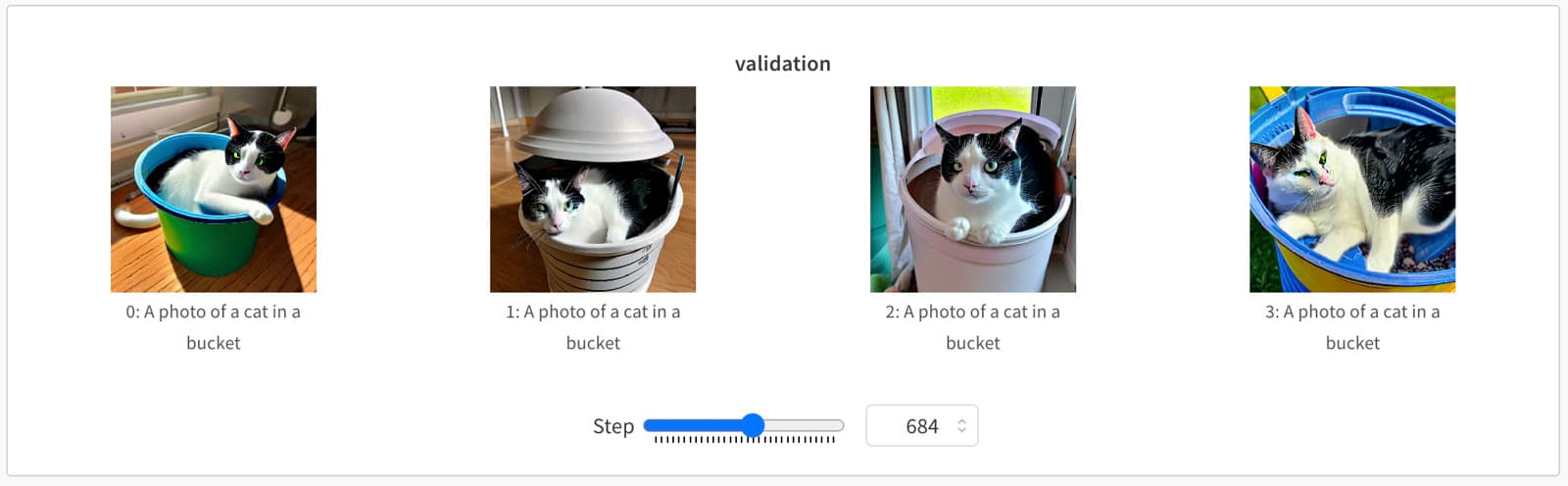
If you use W&B, the validation results (4 generated images from the prompt "A photo of a sks cat in a bucket") are automatically tracked:
-
at training step 4, the cats are nothing like my cat Miles (underfitting):
-
at training step 684, some cats look really like Miles, especially the second and third ones:
-
at training step 1084, all cats have weird eyes:
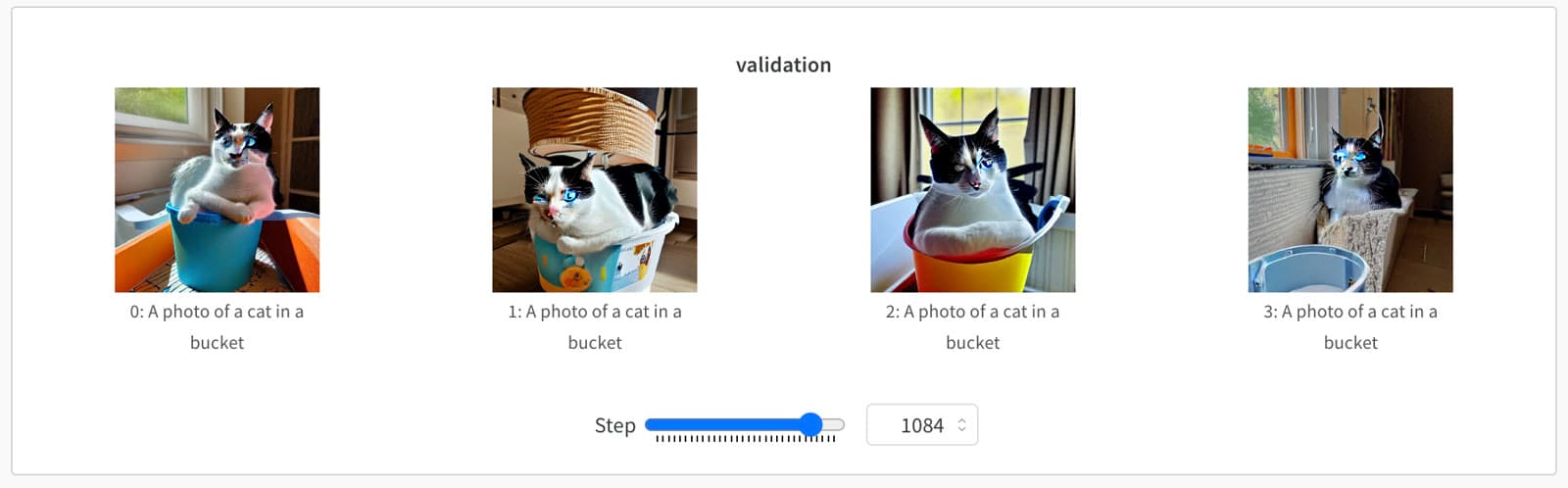
In this case, choosing a checkpoint close to step 684 may generate better results.
Once the training is finished, the fine-tuned LoRA weights are stored in the output folder, which is ./models/dreambooth-lora/miles for my cat example above. The folder includes the final weights and intermediate checkpoint weights.
Use generate-lora.py to generate images using the fine-tuned LoRA weights:
python generate-lora.py --prompt "a sks cat standing on the great wall" --model_path "./models/dreambooth-lora/miles" --output_folder "./outputs" --steps 50You can find other examples to run LoRA fine-tuning using other datasets here and examples to run DreamBooth without LoRA as well.
I also have not experimented with different settings on learning rates, prior preservation, schedulers, and text encoder found here, which seem to be quite effective on face fine-tuning.
Convert Diffusers LoRA Weights for Automatic1111 WebUI
If you download Lora models from civitai.com, you can follow this tutorial to use the LoRA models with Automatic1111 SD WebUI.
However, the LoRA weights trained using Diffusers are saved in .bin or .pkl format, which must be converted first in order to be used in Automatic1111 WebUI (see here for detailed discussions).
As seen below, the trained LoRA weights are stored in custom_checkpoint_0.pkl or pytorch_model.bin:
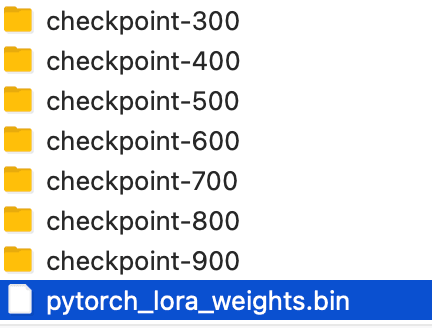
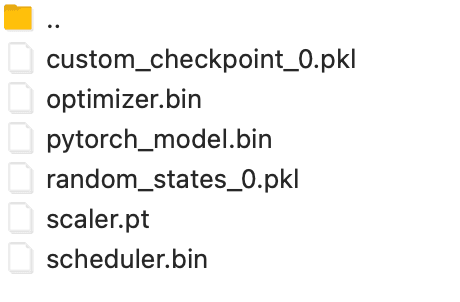
convert-to-safetensors.py can be used to convert .bin or .pkl files into .safetensors format, which can be used in WebUI (just put the converted the file in WebUI models/Lora). The script is adapted from the one written by ignacfetser.
Simply put this script in the same folder of the .bin or .pkl file and run python convert-to-safetensors.py --file checkpoint_file
PS: if you want to convert Lora models from civitai.com to diffusers format so that you can use them using code, please check out this [PR](Lora models from civitai.com).
Fine-tune using WebUI
You need to install Automatic1111 WebUI and two extensions d8ahazard/sd_dreambooth_extension and kohya-ss/sd-webui-additional-networks - check out my installation instructions and then follow the Youtube tutorial to train.
I run into many issues and finally trained a model successfully using 12G 2080Ti:
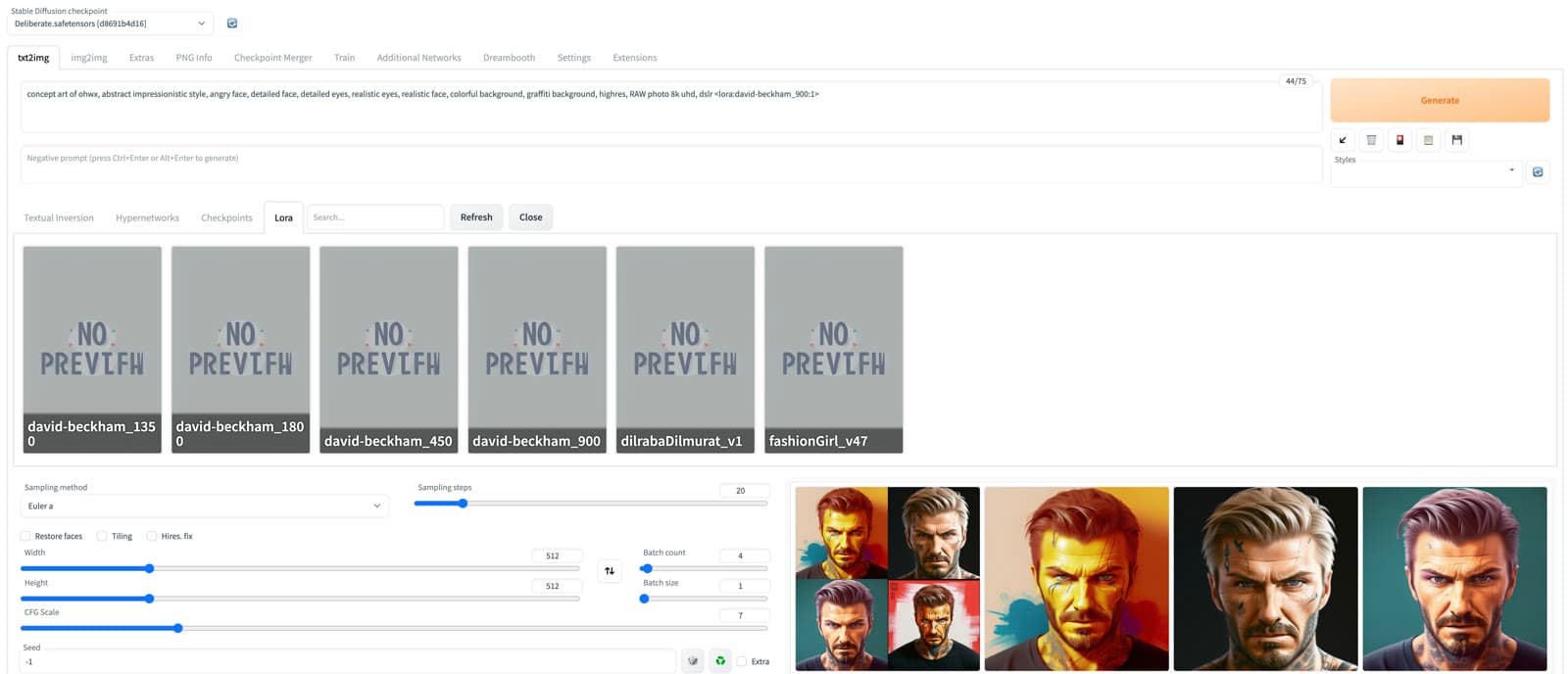
I record the issues and solutions below in case you need them:
-
when you use Performance Wizard, some training parameters might be wrong, which can cause issues, such as Step Ratio of Text Encoder Training value empty, batch size set to non-integer, etc.
-
Fresh new model with Lora model list empty - make sure to reload setting after changing the json file.
-
Dataset and class image folders must be separate (don't put reg images inside training images - recursive reg image generation)
/home/hjwang/finetune-sd/data/dreambooth/david-beckham /home/hjwang/finetune-sd/data/dreambooth/david-beckham-reg -
Uncheck Cache Latents to save GPU - I need to uncheck this to avoid CUDA out of memory error on 2080Ti
-
Lora Weights not compatible with kohya-ss/sd-webui-additional-networks - solved by pulling from the
devbranch (3/6/2023) -
no need to use special tokens such as sks, ohwx, just use a common word, e.g., david-beckham, 3d-avatar
Merge Models
Another way to get a custom model is via merging existing models, which can be easily done using Automatic1111 WebUI by following the tutorial here.
I use an example to show why and how to merge models. You can find tons of models and model merging receipts from civitai.com.
The following XY Plot shows the generated images using the prompt "cat" and seed values from 1 to 5 from three models (top to bottom):
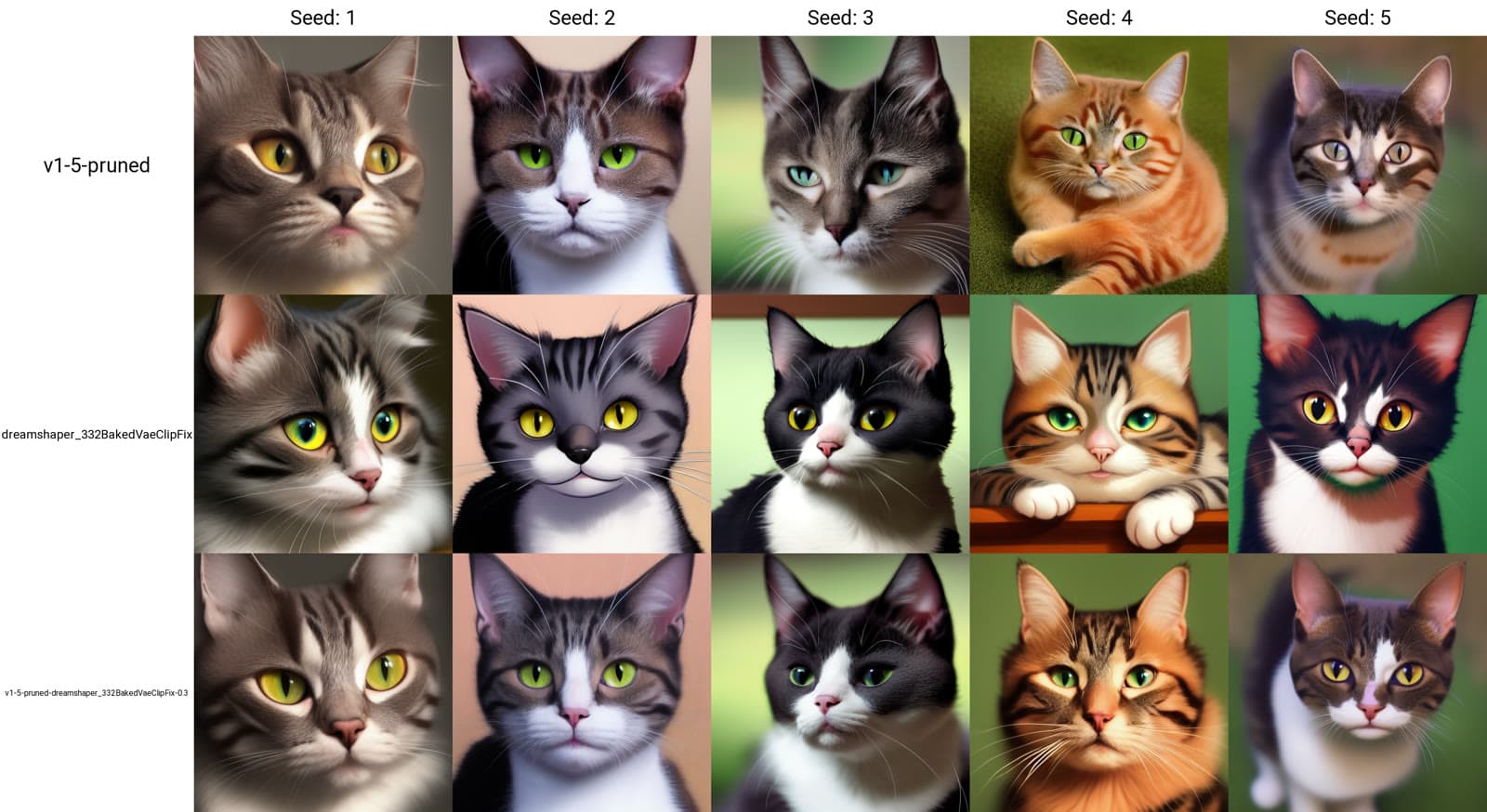
- the SD 1.5 base model: the cats are realistic, i.e., like real cats
- the Dream Shaper model: the cats are very "dreamy", i.e., cartoon-looking with a more artistic touch.
- my merged model of the two models above with multiplier setting 0.3, which means I want to have 30% of the DreamShaper model effect merged into the SD 1.5 base model. The results clearly show the balanced effect - realistic with a more dreamy feeling (merging the two models only takes less than 2 minutes on Tesla V100).
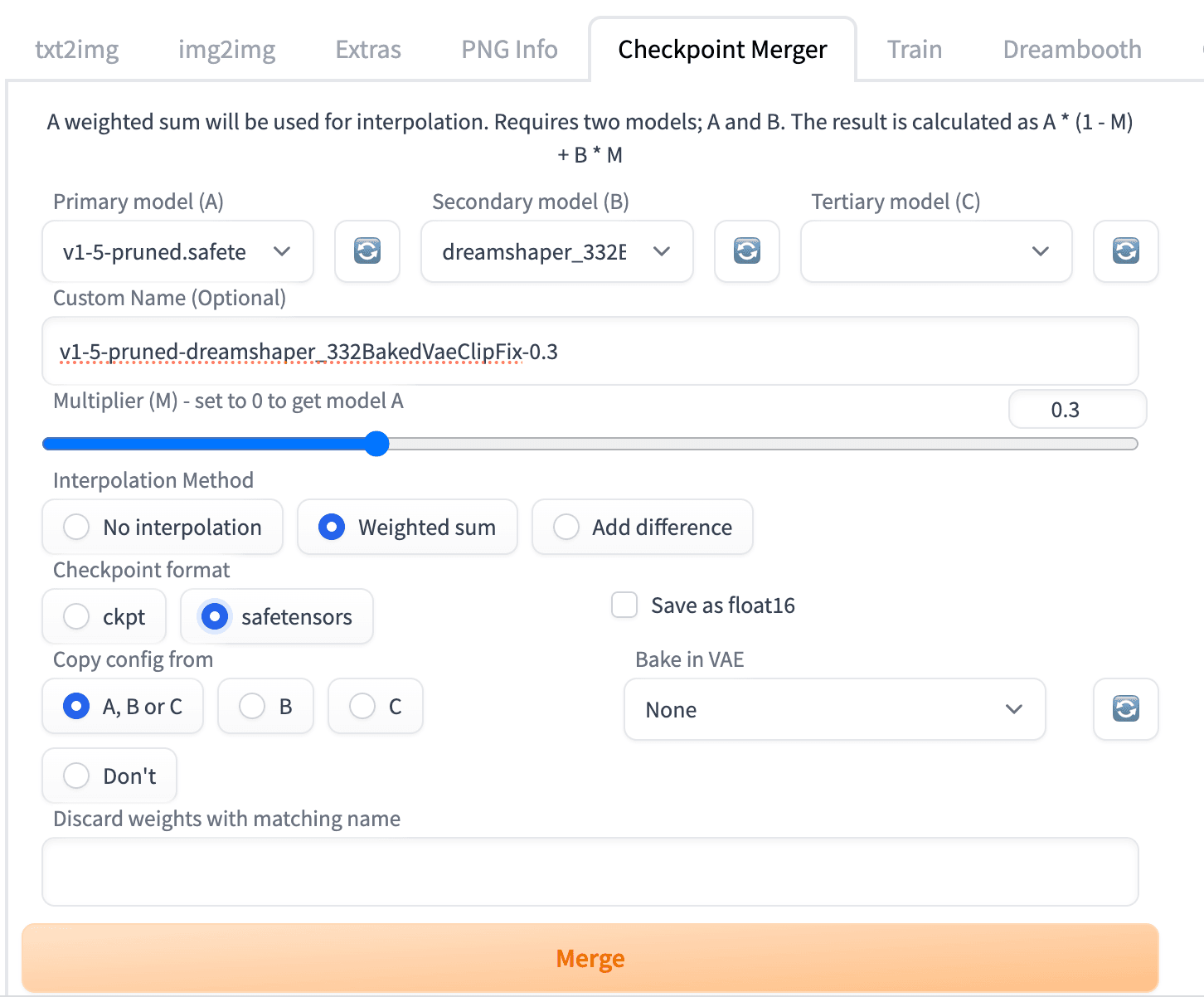
By repeating the model merging steps, you can generate models with targeted effects, and many popular models are merged models, such as DreamShaper mentioned above, Photogen, PastelMix and many NSFW models.
References
- https://huggingface.co/blog/lora
- https://huggingface.co/blog/dreambooth
- https://tryolabs.com/blog/2022/10/25/the-guide-to-fine-tuning-stable-diffusion-with-your-own-images
- Various posts in the unofficial Stable Diffusion subreddit
PS. The first image for this post is generated via Midjourney using the prompt "experiment cooking with thousands of different receipts and flasks flying in the universe ".